An expense tracker for couples: one budget, two phones
Monavo is an expense tracker two people use from their own phones.
Pair them by scanning a QR code. From then on, each of you logs expenses the way you always would — type groceries 62 and it's saved — and you both see the same budget, categories and recurring bills. Every expense shows who added it.
No joint bank account, no bank linking, nothing to share except the QR code.
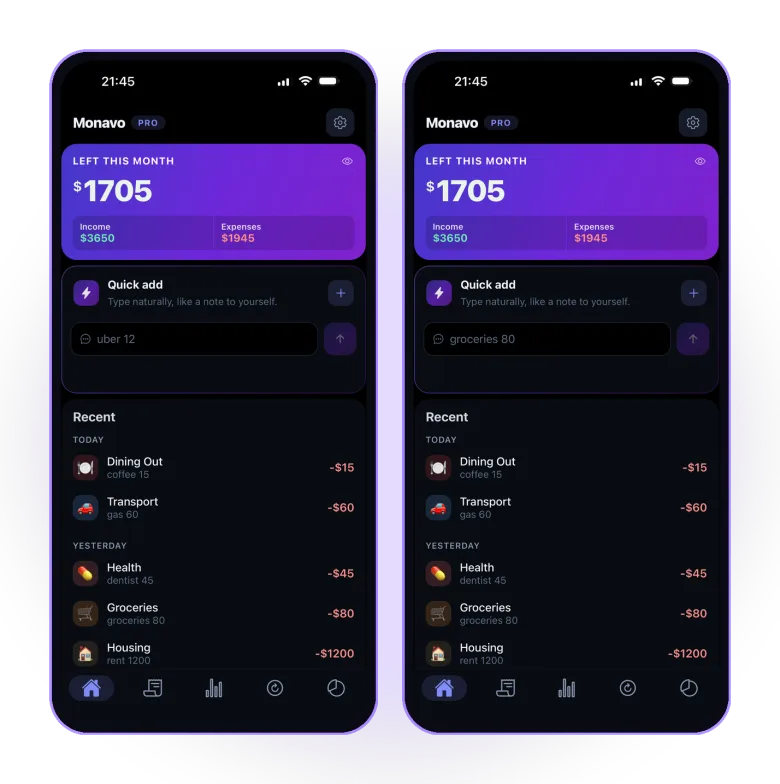
How pairing works
- On one phone, open Settings → Account and make the QR code.
- Scan it with the other phone. That's the whole setup; there are no passwords to hand over.
- Each of you adds expenses from your own phone. Both see the same budget, expenses, categories and bills, kept in sync.
Add or delete a category on one phone and it changes on the other. Disconnect anytime, from either phone. An iPhone and an Android connect to each other.
Who paid what
Every shared expense shows the person who added it, so "did you log the groceries?" and "who paid the electricity?" stop being questions. Monavo labels each expense; it doesn't total them per person or work out who owes whom. For the arithmetic, the couple expense split calculator compares 50/50 with a split in proportion to income.
What it costs for two
One plan, two phones. A single Pro subscription covers both connected phones; you don't pay twice. Pro is $19.99 a year or $2.99 a month, with a 7-day free trial. Lifetime is $39.99, paid once, and covers both phones too. Everything else — logging by typing, budgets, recurring bills, insights, 150+ currencies — is free on each phone on its own, with no time limit.
What stays private
Neither of you links a bank, and you keep your own accounts. The data lives on your phones; what travels between them is the encrypted sync, and only when pairing is on. Pairing runs through the cloud backup that comes with Pro, which is where an email comes in — it's the only account there is, and until you pair, nothing leaves the phone.
Not sure Monavo is the right one?
I've compared it with Honeydue, Goodbudget, Monarch, YNAB and Copilot in the best budget app for couples, including where each of them is the better choice. If you'd rather never type an expense and have the bank do it, that comparison says which apps do that.
Frequently asked questions
Do we both need to pay?
No. One Pro or Lifetime plan covers both connected phones, even across iPhone and Android.
Do we need a joint bank account?
No. Monavo doesn't connect to any bank; you each keep your own accounts and log the expenses you pay.
Can we use Monavo if we keep our finances separate?
Yes. Monavo doesn't need a joint account or shared finances. It's one shared list of expenses: log the household spending there, and the rest stays wherever you track it now. Everything logged on either phone shows on both.
Can we see who spent what?
Yes. Every shared expense is labelled with the person who added it.
Does it work with an iPhone and an Android?
Yes. The two phones connect to each other regardless of platform.
How many phones can share one budget?
Up to three.
One budget, two phones. Free to start.
No account. No bank linking. No ads. Just download and go.